
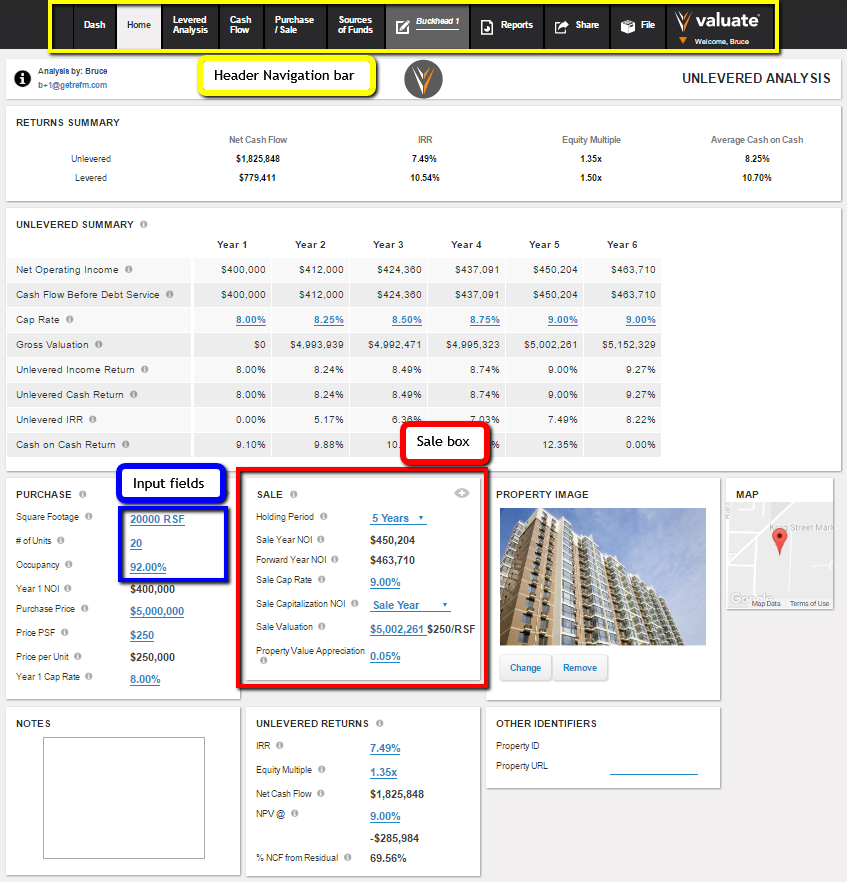
- Header Navigation bar (boxed in yellow) - the main navigation of the application, with buttons for the individual main input screens, reports, file actions and account management
-
Screen, Page or Tab - each of the main screens of Valuate, accessed primarily via the Header Navigation bar:
-
Dash = Dashboard
- Levered Analysis
-
Cash Flow
-
Purchase/Sale
-
Sources of Funds.
-
Box (sample boxed in red) - any of the rectangular boxed components of a screen, such as the Sale box
-
Input field (sample boxed in blue) - any field into which a bold blue input is made, whether numeric or text.
Comments
0 comments
Please sign in to leave a comment.