
The Sale Cap Rate (aka exit cap rate) for the asset sale Gross Valuation can be input on both the Dashboard tab in the Sale box (as seen below in the bottom-most red box) and also on the Purchase/Sale tab. Whatever Sale Cap Rate is input into the Sale Box, that is what the Cap Rate will be in the Unlevered Summary table in the Sale Year and the Forward Year (as shown in the top-most red box, in black font, uneditable).
For the years prior to the Sale Year (shown boxed in blue below, in blue font, editable), the Sale Cap Rate can be modeled to show what the Gross Valuation and unlevered returns would be assuming sale at the end of each of those interim hold period years.
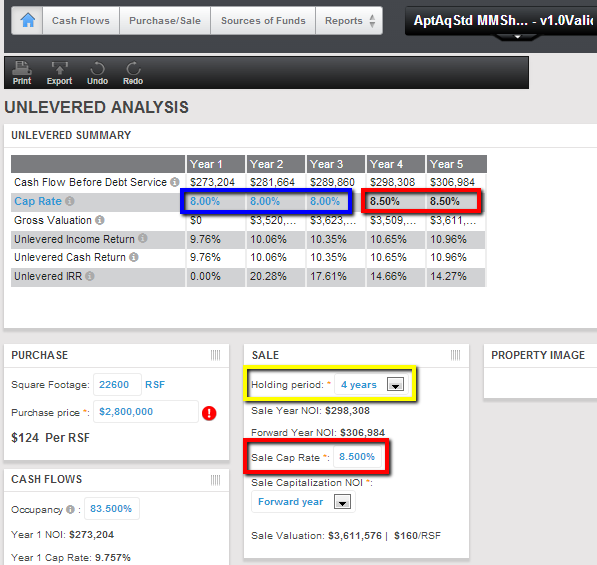
Note: if you change the holding period (boxed in yellow), the cap rate percentages of the Sale Year and the forward Year will be changed to the value of Sale Cap Rate input.
For the years prior to the Sale Year (shown boxed in blue below, in blue font, editable), the Sale Cap Rate can be modeled to show what the Gross Valuation and unlevered returns would be assuming sale at the end of each of those interim hold period years.
Note: if you change the holding period (boxed in yellow), the cap rate percentages of the Sale Year and the forward Year will be changed to the value of Sale Cap Rate input.
Comments
0 comments
Please sign in to leave a comment.