
You can share a file by generating a public link accessible by anyone who has the link.
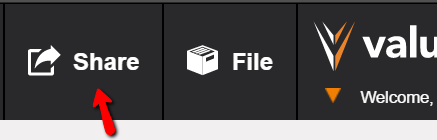
To create a public link, when the file is ready to share, click on the Share button at top.
The state of the file will be "frozen" at the point at which you click the Share button.
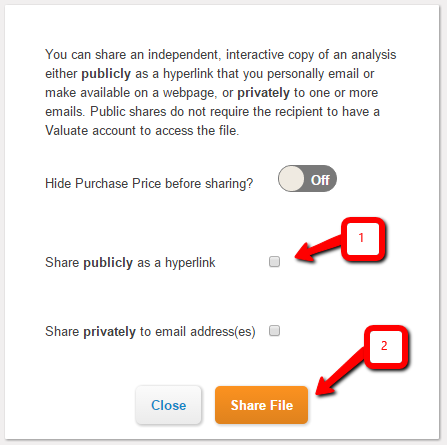
Check the "Share publicly as a hyperlink" checkbox and then click the orange Share File button.
A unique link will be generated, which you can copy and paste into an email for sharing, or embed as a hyperlink on a web page. The unique link will also be emailed to you so you can forward it to others easily.
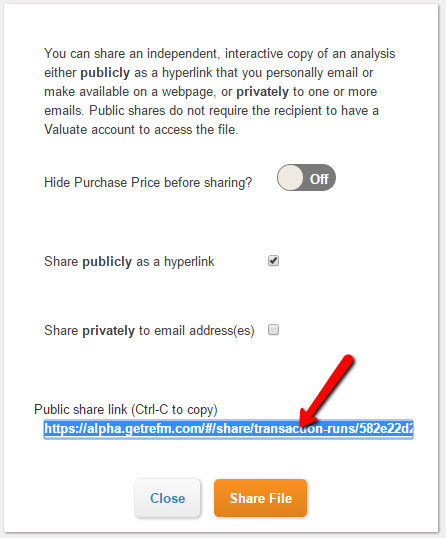
NOTE: If you wish to share the transaction on an unpriced basis, click on the "Hide Purchase Pricing before sharing?" slider to switch it to "Yes". This will result in the recipient needing to enter a preliminary purchase price before they can access the file.
Anyone who accesses the link will have free Guest access to a copy of the file. They do NOT need a Valuate account at all -- they can fully manipulate the file privately, independently, and without any impact to your original file.
You may continue to use and change your shared file without any impact to the copies of the file shared to the recipients.
Comments
0 comments
Please sign in to leave a comment.