
Context
Valuate is designed to be more flexible and also to provide more feedback to the user than the typical real estate analysis software.
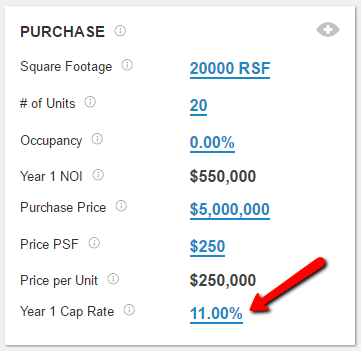
With respect to flexibility, some values that display as inputs are actually both inputs and outputs in the Valuate system depending on the user's behavior. An example is the Year 1 Cap Rate on the Home screen, which is by default a calculated output (Year 1 NOI/Purchase Price), but can also be overwritten by the user, forcing the Purchase Price to adjust to satisfy the newly inputted Cap Rate value.
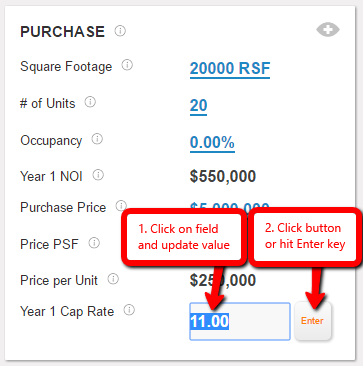
In terms of providing feedback, Valuate communicates with the user by displaying alert messages. If you try to make an input is outside of the bounds specified below, or the input you make causes one of the variables below to be outside of the specified bounds, Valuate will stop calculating and present you with an alert message such as this:

List of lower and upper bounds
NEW FILE CREATION
Year 1 Effective Gross Revenue (EGR): Minimum is $1, maximum is governed by the Cap Rate bounds laid out below.
Holding period: Minimum is 2 years, maximum is 10 years
Purchase Price: Valuate does not limit user inputs for Purchase Price. We recommend that the user always sanity check their inputs and outputs and operate within the boundaries of $1,000 and $500,000,000 for this purpose.
NOTE: Valuate will allow you to create a file that models a financial loss on an unlevered basis. Valuate will recommend that the user either make changes to specific variables by showing you an alert message or messages related to the faulty input(s) or allow you to ignore them.
HOME SCREEN
Cap Rate, Year 1 Cap Rate, Sale Cap Rate: Valuate does not limit user inputs for Cap Rate, Year 1 Cap Rate, or Sale Cap Rate. We recommend that the user always sanity check their inputs and outputs and operate within the boundaries of 3% and 29% for this purpose.
Equity Multiple: Valuate does not limit user inputs for Equity Multiple. We recommend that the user always sanity check their inputs and outputs and operate within the boundaries of 1.0x and 25.0x for this purpose.
Purchase Price: Valuate does not limit user inputs for Purchase Price. We recommend that the user always sanity check their inputs and outputs and operate within the boundaries of $1,000 and $500,000,000 for this purpose.
Purchase Price PSF: Valuate does not limit user inputs for Purchase Price PSF. We recommend that the user always sanity check their inputs and outputs and operate within the boundaries of $10 and $10,000 for this purpose.
Sale Valuation: Valuate does not limit user inputs for Sale Valuation. We recommend that the user always sanity check their inputs and outputs and operate within the boundaries of $1,000 and $500,000,000 for this purpose.
CASH FLOWS SCREEN
If Detail Load mode is being used, the projection length must be at least as long as the Holding period.
SOURCES OF FUNDS SCREEN
Purchase Price: Valuate does not limit user inputs for Purchase Price. We recommend that the user always sanity check their inputs and outputs and operate within the boundaries of $1,000 and $500,000,000 for this purpose.
Cap Rate: Valuate does not limit user inputs for Cap Rate. We recommend that the user always sanity check their inputs and outputs and operate within the boundaries of 3% and 29% for this purpose.
Loan to Value Percentage: Minimum is 0% (i.e., no debt used in the transaction), maximum is 100% (i.e., no equity used in the transaction)
Sponsor equity: In a multiple equity player scenario, minimum is 0%, maximum is 99.999%. When Sponsor equity is input as 0%, it is assumed to be a scenario modeling Sponsor "Sweat Equity". In a single equity player (sponsor-only) scenario, equity is 100% by default.
Sponsor Promote: Minimum is 0%, maximum is 100% less the other party's equity %.
Third Party Investor equity: Minimum is .001%, maximum is 100%

Comments
0 comments
Please sign in to leave a comment.